
Transform data into actionable insights using IBCS, Power BI, and efficient data models
Fabric

Power BI Without Fabric Is Like Owning a Sports Car but Leaving It in Eco Mode
Preamble: This article is not meant to be a fully comprehensive guidance why adopting Microsoft Fabric makes sense for every organization. Instead, it highlights a collection of practical examples showing the benefits Fabric can deliver — even if your primary interest is Power BI. The views expressed here are my own and do not represent […]
Tools
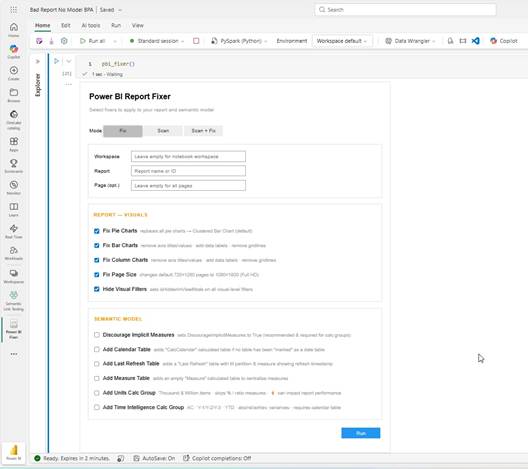
Power BI Fixer — One Line to Fix Them All
How a single Python call in a Fabric Notebook can assess, standardize, and fix your Power BI reports and semantic models at scale. DISCLAIMER: RUN THE SCRIPT AT YOUR OWN RISK. NOT MICROSOFT AFFILIATED. Why This Matters Every Power BI developer knows the pain. You inherit a report — or revisit one you built six […]

Two Tools Tabular Editor MacroActions.json to Full Repository and Vise Versa
Convert your MacroActions.Json file into a full repository of scripts, or do the reverse – convert a ZIP of scripts back into MacroActions.json. Here are two free tools for you: MacroActions to Scripts: Tabular Editor Scripts Extractor Scripts to MacroActions: Tabular Editor Parser – Zip to MacroActions Tool The Problem Managing Tabular Editor macros becomes chaotic as […]

PowerShell – Power BI Fixer – Holy Grail of Power BI
I am super stocked to showcase a new script. The script is the banger, since it can modify and improve massively already deployed Power BI reports, within just a few minutes. Just run the script and all reports of one Power BI workspace are automatically upgraded. This is definitely an extension to my previous PIMP […]

My Power BI Toolbox: 80+ Tabular Editor Macros to Automate Data Model Development
When it comes to streamlining your Power BI data modeling, the value of automation cannot be overstated. One of the most powerful tools available to achieve this automation is Tabular Editor, where you can write C# scripts to optimize and automate repetitive tasks. In this blog post, I’ll introduce you to my Power BI Toolbox […]

Power BI – Pimp – Script
Do you would like to apply data model best practices with a click of a button to your existing Power BI reports? Than the “PBI-Pimp-Script” is the right place for you! Edit: This script had a major revamp, published on 31. January 2024 and includes now a lot more: Explicit Measure Creation, Units calc group, […]
IBCS

“IBCS Power BI Generator”: Automate your Power BI report development
DISCLAIMER: You are running the tool at your own risk. The tool is currently deleting and replacing all current report pages, including all visuals. So make sure to have a backup. I continuing to develop the tool as we speak. This is hopefully just a start. Manual Introduction In today’s data-driven business environment, the need […]

Myths about Red-Green Deficiency in Visualizations
Disclaimer: I am not an “Ophthalmologist”, so don’t cite me here and if you actually have a red-green blindness and/or disagree on the following article please ping me via LinkedIn. It is not as simple as it seems. 😊 Color is a crucial element in data visualization and communication, significantly impacting how effectively information is […]

IBCS with Power BI’s Built-In Visuals & Custom Visuals
Power BI is a powerful tool for creating visually engaging and actionable reports, and in my opinion it is also the best tool to apply IBCS to its fullest potential. In case you would not know IBCS is a set of guidelines for creating effective and actionable reports that provide clear and actionable insights. If […]
The Importance of Actionable Reporting in BI & Reporting Best Practice IBCS
Business Intelligence (BI) is a powerful instrument that can help organizations make better decisions and improve the company’s performance. However, very often I encounter poor BI reports with little to no insight. The assumption in this article is that poor reporting does not stem from an intent to deceive or misinform the report’s target audience. […]
Best Practices

Spot Poor Power BI Reports: No4. No “EMPTY MEASURE TABLE”
When building Power BI reports, deciding where to place your measures—whether in a dedicated measure table or directly in the fact table—can impact both usability and maintainability. Here’s a look at why creating a separate measure table often works best and why it’s becoming a popular approach for Power BI developers and report consumers alike. […]

Spot Poor Power BI Reports: No3. No Units Calculation Group
When working with large datasets in Power BI, displaying big numbers—especially those over a million—can become a challenge. Lengthy figures not only clutter your visuals but can also confuse your audience. To enhance readability and comprehension, it’s essential to format these numbers into thousands, millions, or even billions. While Power BI offers several methods to […]

Spot Poor Power BI Reports: No2. The Lonely Fighter
Okay this is not exactly a poor Power BI report or mistake per se, but might be just one contributing factor for your “poor Power BI report”. Have you learned your Power BI skills mostly by yourself via YouTube, reading through the endless Microsoft documentation, or some “secret blog article” like mine? 😉 Here is […]

Spot Poor Power BI Reports! No1: The Slicer Mess
This article is part of a series on how to spot a poor Power BI report. There are many pitfalls, which are obvious like 3D Pie Charts, but then there are others which are less obvious. We all have done those mistakes, we actually all of us make some of those still every day, aware […]
My Top 10 Tabular Data Model Best Practices
Video Walkthrough This article heavily relies on the information of Michael Kovalsky’s blog article “Top 10 Power BI mistakes and their best practice solutions” published on his website elegantbi.com. The last three points are additions to Michael’s article, focused more on data model best practices, less focused on data model performance. When working with Power […]
PBIRS

The Hammer for your Power BI Report Server Issues
For many IT admins, troubleshooting a Power BI Report Server can be a daunting task. With so many potential sources of error and so much data to collect, it can be difficult to know where to start. Fortunately, the Power BI Report Server Troubleshooting Tool is here to help. Think of this tool as a […]

Power BI Report Server Monitoring Tool
As a support engineer, we often receive requests for usage, audit, or monitoring reports for Power BI Report Server. Sometimes, there are support requests, users could easily self-resolve themselves if they would just have the right tool. For Power BI Service there are audit and monitoring templates available, but for Power BI Report Server there […]

Power BI Report Server Monitoring for Subscriptions and Schedule Refreshes
As a Power BI Report Server Administrator, it is crucial to monitor the performance of your report server and keep track of your subscriptions and schedule refreshes. Inefficient utilization of report server capacity is a common issue, for instance, when there are specific periods of high server load and others with minimal activity. This can […]
Other

ULTIMATE LinkedIn Power BI Report Template: Insights & CV
In the digital age, the ability to analyze your professional network and present your career accomplishments can significantly impact your success. Two distinct yet interconnected areas where Alexander Korn has excelled are the analytics of LinkedIn engagement and the automation […]

Must-Have Certifications for a Power BI Expert
In today’s rapidly evolving world of data analytics, certifications have become a valuable tool to showcase one’s expertise and knowledge. As a Power BI expert, you understand the importance of staying ahead in this competitive field. But which certifications are essential for a Power BI professional to possess? In this article, we will explore the […]
This blog has been created in January 2023. It covers a range of BI topics with a focus on Actionable Reporting through Power BI and all related topics. Follow me on LinkedIn with the bell to get notified whenever I release a new blog article.
Other featured Works
The following report is used to analyze flights uploaded to dhv-xc. The portal is used to track all paragliding flights and therefore one main tool for German paragliding athletes to track their progress and success. The report was featured in a German blog post by Lucian Haas (most important European paragliding blog). https://lu-glidz.blogspot.com/2019/12/dhv-xc-analyzer.html
Open DHV XC Analyzer in Power BI (full screen)
More about Me
My passion, expertise and hobby is Power BI.
But the more I learn, the more I realize how little I know. As “Solution Engineer – Data Platform” at Microsoft I am challenged every day to dig deeper into the Microsoft BI microsphere.
I am grateful for the various resources and blogs that have assisted me on this journey so far. Through this blog, I hope to be able to contribute and give back to the community a little bitty as well.
Outside of my hobby Power BI, I tend to spent it with my wife and three boys or alternatively just surfing with my paraglider from one cloud to the next.
Contact
Disclaimer
I am working as Solution Engineer for Microsoft. However this blog is unaffiliated with Microsoft, any opinions or comments expressed here are my own.
Follow Me
This blog and site showcases a few commercial and personal projects created throughout my career but clear focus is the blog for now. Subscribe to my social media or my blog using the following RSS feed to get updated when I add new stuff:
https://actionablereporting.com/feed/
Get in Touch
alexander_korn@me.com
https://www.linkedin.com/in/alexanderkorn