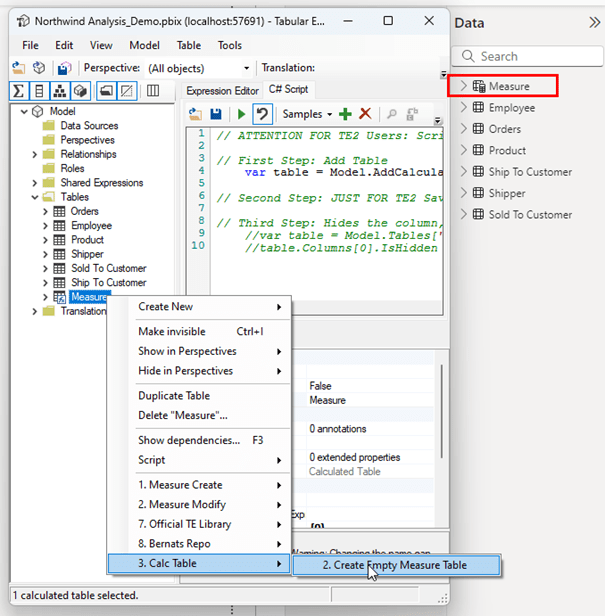
When building Power BI reports, deciding where to place your measures—whether in a dedicated measure table or directly in the fact table—can impact both usability and maintainability. Here’s a look at why creating a separate measure table often works best and why it’s becoming a popular approach for Power BI developers and report consumers alike. I call the approach of a dedicated measure table as “EMPTY MEASURE TABLE” because it is just a container, no actual data is in there, except maybe the relationships but that’s a minor detail.
Advantages of a Dedicated Measure Table
- Clear Structure for Reports Under Development: Fact tables are often “work in progress” —especially in development or test environments — where new measures or transformations may still be in the pipeline. A measure table provides a consistent location for measures even if the fact table is incomplete.
- Ease of Development: From a developer’s perspective, having all measures in a single, separate table makes it easy to find and work with them. It avoids digging through the fact table, especially when it’s not fully denormalized.
- Attributes in Fact Table are unavoidable: Normally attributes in fact tables like an invoice number should be ideally avoided. But as we all know business request are a priority and this can’t be always avoided. As a result the fact table will not move to the top with the calculator icon. And if that is the case Measure Table for sure it is. A separate invoice number dimension table is also not optimal.
- Easier Tracking of Incomplete Work: Developers can quickly see if a fact table still needs further adjustments without having to go through measure definitions, as all measures are in their own place.
- Non-Disruptive Maintenance: When tables are deleted, measures in a separate measure table remain untouched, avoiding accidental data model breakages due to table deletions.
- Improved User Experience: Users may not always understand the difference between fact and dimension tables, and a dedicated measure table avoids confusing them with technical table names. This is especially helpful when users need quick access to measures such as variance or trend measures across multiple tables. Users don’t have to dig through multiple tables to find what they need.
- Consistent Naming Conventions: A measure table supports streamlined naming conventions. While dimensions and facts are often tagged in table names, this isn’t necessary with a measure table, which can be kept hidden or labeled more intuitively, contributing to a cleaner, more navigable model.
Encounter the disadvantage of Excel functionality:
Is the data model used in excel a lot the empty measure table approach should very carefully considered and maybe thrown over board.
- Drillthrough Flexibility: Yes the big disadvantage of missing the drillthrough needs to be addressed with additional work with detailrowexpression. Maybe we could set it on the table level instead of on the measure level. For more details on this: https://www.sqlbi.com/articles/controlling-drillthrough-in-excel-pivottables-connected-to-power-bi-or-analysis-services/
- Missing Relationships: In Excel normally the relationships are automatically visible. That means no wrong relationship can be used. With “Empty measure tables” manually setting up fake relationships is needed. Obviously this can’t be done as exact, since different measures might have different relationships.
Naming Convention
Did you know that you can’t use “Measures” as name for your empty measure table? The best next alternative is “Measure” – Easy fix.
Organization in Display folders
Obviously organizing the measures in folders and subfolders is needed, but this is unrelated to the fact which approach should be chosen. Organizing that way can be done in both worlds.
But how do I implement it?
Here is a super easy two step process in Tabular Editor 2. Just paste it into C# Script and Execute the two scripts separately.
// ATTENTION FOR TE2 Users: Script needs modification AND needs to be run in 3 steps

// First Step: Add Table
    var table = Model.AddCalculatedTable("Measure", "{0}");

// Second Step: JUST FOR TE2 Save Data Model Changes
// Third Step: Hides the column, uncomment the next two lines and execute it separately to the previous creation
var table = Model.Tables["Measure"];
table.Columns[0].IsHidden = true; Final Thoughts
Using a separate measure table provides a cleaner, more efficient Power BI model that’s easier for both developers and end-users to navigate. This approach aligns with best practices in data model design, creating a well-organized, scalable, and maintainable report structure.
And once again if Excel usage is a priority, the approach should be carefully considered and maybe revert back to the fact table approach. But than push hard to have it fully denormalized / all columns hidden.
 Blog about Actionable Reporting - Alexander Korn